

On this page
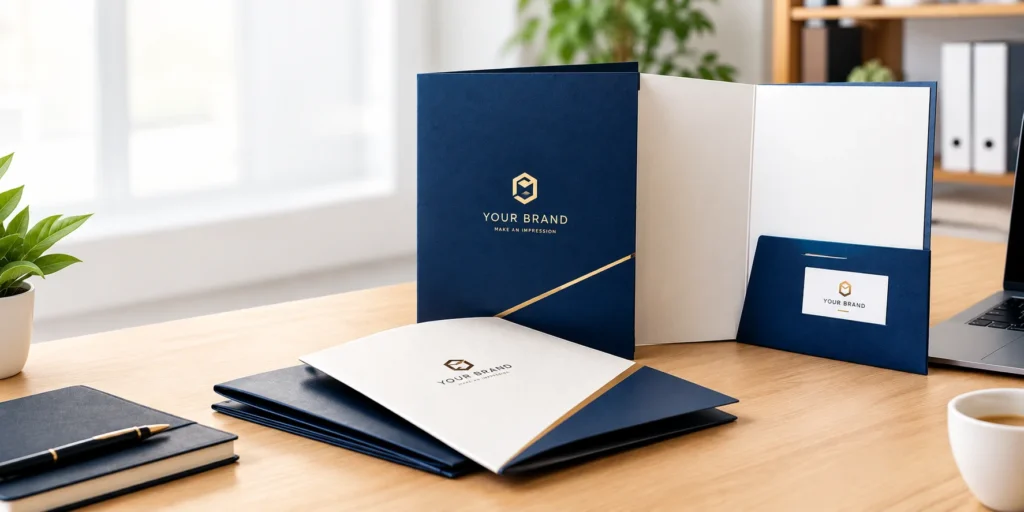
This might seem old school but a custom presentation folder is still the first choice of many businesses while they are pitching a big project or onboarding clients. That’s because they make a brand look established and professional. Moreover, they present documents in a neat, organized manner. This proves that custom presentation folders serve as a physical extension of your business. And before you order them for your company or brand, pick your options carefully as every detail matters.
Actually, there are so many customization options available, that one wrong move and you can waste your money and ruin your company’s image. Therefore, in this guide we will help you choose the right size, style, cardstock, and finish for luxury presentation folders.
What Is a Custom Presentation Folder & Why It Still Matters In a Digital World?
A custom presentation folder is a branded folder used for holding documents like contracts, project proposals, sales sheets, and brochures. You can find generic office folders in the market or get them customized too as per your company’s requirements and promotional needs.
Although we are living in the digital world, where emails and PDFs are dominating the industry. Yet presentation folders are widely used by businesses. Why? The answer is simple. Emails or PDFs are easy to close or delete, therefore your company loses its chance to make a strong visual impact. On the contrary, a presentation folder offers physical interaction. Its premium design and fine material quality shows that the business is stable and dependable. This establishes a trust bond which an onscreen document fails to do so. Also:
- You can effortlessly organize your loose paper sheets and present them in a clean easy-to-navigate format. This signals the clients that you respect their time and attention.
- Lastly, printing the folders with your business logo, colors, and typography allow you to use them as a marketing tool.
So, do you want custom-made folders for your business? Then, look into our presentation folder buying guide that can help you print folders that stand out.
A Guide to Choosing the Right Anatomy & Features of Custom Presentation Folders
Here is how to order presentation folders. First of all you have to define the purpose and intended use of the folder. This will solve your size, style, and structural design issues. For instance, if you want to hand over legal documents, you will need oversized or folders with expanded capacity options. So that you can fit legal contracts, title deeds, and property brochures all in one.
Second, decide on the number of paper sheets that will go inside the folder. This will help you decide whether you need an expansion spine or not. Usually a standard folder can hold up to 15 sheets per pocket. But if the sheet number exceeds 20 or 25, then the pockets tear or the folder stays open. That’s when you need an expansion spine for the folders.
If you have no idea in what category your documents fall, here are the standard presentation folder sizes along with their intended use. This will help you choose the right folder size and orientation for your project.
Standard Pocket Folders
A standard pocket folder is 9″ x 12″ in size used for holding standard 8.5″ x 11″ US letter size papers. They typically feature two interior horizontal pockets (usually 3 to 4 inches deep) attached to the left and right panels along with slits cut into one or both interior pockets to securely display a business card.
Mini & Small Folders
Mini folders come in two sizes. 4″ x 9″ and 6″ x 9″. These folders are compact, lightweight and are used for half letter size pages. Such as event booklets, promotional cards, event passes, or gift vouchers.
Legal Size Folders
Since the standard size of a legal sheet is .5″ x 14″, therefore cannot fit into a 9″ x 12″ folder. That’s why for legal documents, a 9.5″ x 14.5″ folder is used. It displays the property deeds, tax returns, and settlement statements without folding or creasing.
| Folder Type | Folder Dimensions | Ideal Insert Sizes | Common Applications |
|---|---|---|---|
| Standard Pocket Folder | 9” x 12” | 8.5” x 11” | Corporate Proposals, Sales Decks, Press Kits, Media Guides |
| Mini & Small Folder | 4” x 9” or 6” x 9” | 3.75” x 8.5” and 5.5” x 8.5” | Vouchers, Receipts, Event Schedules, Rack Cards |
| Legal Size Folder | 9.5” x 14.5” | 8.5” x 14.5” | Real Estate Closing, Legal Contracts, Financial Audits, Tax Filings |
Select the Right Paper Stock & Weight
A flimsy folder made from low-grade cardstock looks cheap. Thus, bad paper choices can ruin your great presentation. Don’t let it happen to you. Instead pick high-grade, thick stocks to manufacture the folders. Usually there are two types of materials used, coated and uncoated paper stocks.
Coated cardstocks come with a glossy finish that prevents ink from seeping into the paper. They even support full-color printing, allowing for high-contrast branding. On the other hand, uncoated stocks lack the glossy finish that’s why the inks easily seep into the paper fibers. These papers have a textured surface that offer a sophisticated tactile experience. Once you choose your stock, the next decision is to select the material thickness. You can either pick 10pt to 12pt or 14pt to 16pt thick paper. 14pt to 16pt stocks are highly rigid and give a premium feel. They are resistant to bending, creasing, corner wear, and are best used for luxury brand presentation or legal docs. However, if you want budget-friendly solutions, then 10pt to 12pt stocks are the ideal option.
Pocket Configurations & Capacity Options
Presentation folders require a structured arrangement of documents. And for this internal pockets are designed. Most folders are customized with single pockets on the right side that can hold 1 to 10 paper sheets. Arranging the documents inside the pocket creates a clean focus on a single set of docs. Folders with single pockets have lower printing cost. But if you have multiple options or proposals to present you can personalize the folders with pockets on both left and right side. Two-pocket folders allow you to categorize information logically. Like you can place the proposal or contract on the right side and company’s brochures on the left side. This helps the clients to comprehend the data easily and make decisions fast.
Also you do add expansion spine to your folders in case the paper sheets exceed the holding limit. Expansion spines allow the folder to expand three-dimensionally, accommodating bulky, multi-page document sets without bulging or bending paper corners.
Finish the Folder with Protective Coating & Decorative Enhancements
Once the size, paper stock, and pocket design is finalized. Then next step in incorporating protecting coatings and embellishing add-ons to the folder. The coating protects the folder from wear and tear whereas the add-ons elevate the visual appeal, enhancing the company’s perceived value. Here are some of the coatings and add-ons options:
Gloss Aqueous Coating: It has a subtle shiny finish and offers protection against scuffs.
Matte Lamination: Matte lamination creates a non-reflective surface that has a velvet like texture. It is suitable for protection against moisture, scratches, and tearing.
Embossing & debossing: Creates a raised or recessed design, artwork, or pattern on the folders. It offers a tactile effect and makes a folder look elegant.
Foil Stamping: This involves adding the metallic accent to logos or borders. Foils highlight the certain part of the folder and add luxury to the overall look.
Artwork Prep & Pre-Press Checklist for Presentation Folders
Even with the right size, paper stock, and premium design, there is still a risk that your presentation folder could be a disaster. And this is when the printing messes up and your folder has a blurry logo, white borders, or unexpected color shifts. To avoid this from happening here is a checklist you must follow before sending your artwork for printing.
- You design all the graphics and artwork in RGB mode on screen. Convert the digital file into the CMYK color mode before submitting the file and mention the specific PMS spot color for 100% color accuracy.
- Ensure all raster images, logos, and artwork are set to a minimum of 300 DPI at 100% of their final print size. This will avoid the pixelated, blurry, or grainy prints.
- Finally keep all the vital text, high-value logos, and contact information at least 0.125″ away from the trim lines, fold lines, and pocket edges to prevent them from getting accidentally cut off.
Get Your Customized Presentation Folders from Boxit Packages
Want the most professionally designed folders for your business? Get them from Boxit Packages, where we allow you to bring together high-end paper stocks, precision die-lines, and specialty finishes for your folders. To ensure your business gets top-quality results, we offer free design support featuring custom artwork and unique layouts. You don’t have to wait long to get your folders. Because our presentation folder printing time is just 6 to 8 business days.
Conclusion
Ordering custom presentation folders is not that difficult as it seems. You just have to be clear about your purpose of use and choose the size, material, finishes accordingly and everything will fall into its place. There will be no loose messy sheets. You will be able to present the proposal or data professionally and build a credible image of your company.
To get premium, fine quality presentation folders contact Boxit Packages.
Need custom printed boxes?
Contact us
.jpg)